claude-code-remote-container

Claude Code on your home server.
In a browser tab, and in the Claude app.

A lightweight container for your NAS or always-on box. It keeps Claude Code running next to your files and containers, opens it in any browser, connects it to the Claude app with Remote Control, and installs updates while you're away.

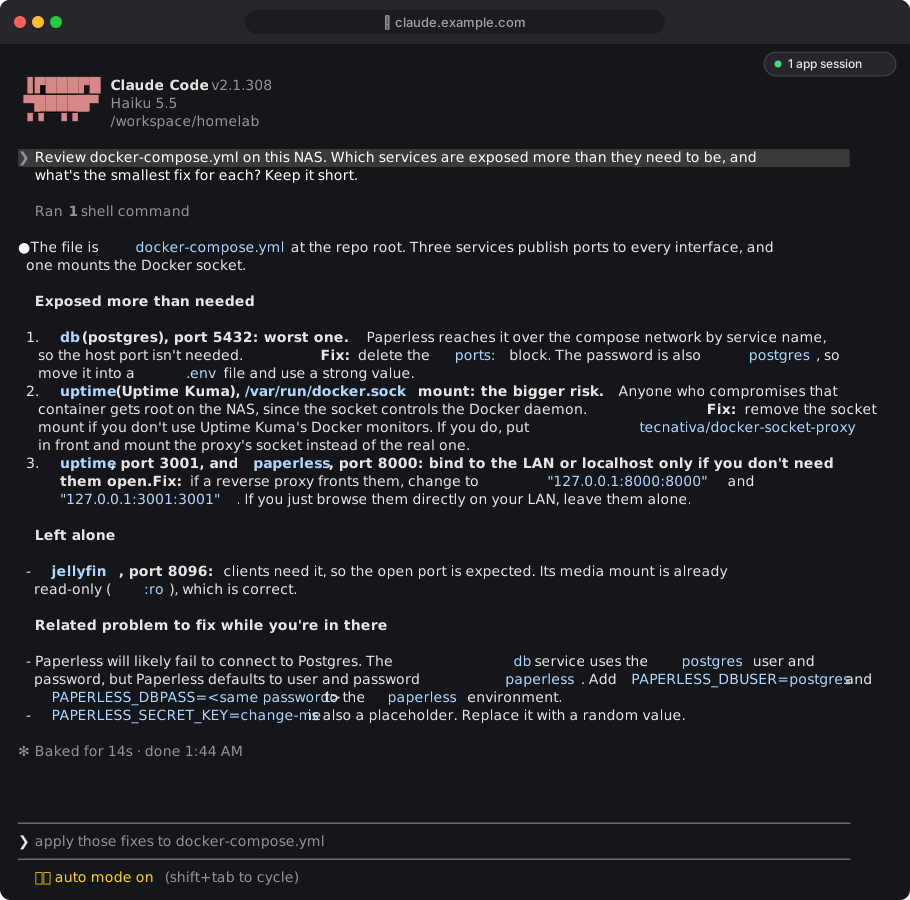
Claude Code reviewing a NAS docker-compose.yml in the web terminal, with the app-sessions badge in the corner
Claude Code's own terminal interface, served from a NAS. Rendered from a real session; the address and folder are placeholders.

Is this for you?

It depends on where you want Claude Code to live.

Use the Claude app

On your Mac or PC

The Claude desktop app, or Claude Code in your own terminal, is the better experience on the machine in front of you. You don't need a container for that.

Use claude-code-remote-container

On a NAS or home server

Synology, Unraid, TrueNAS, a Raspberry Pi, a mini PC under the desk: boxes with no screen that hold your files and run your containers. This puts Claude Code there, always on, reachable from a browser or your phone.

Typical jobs: tidy a compose stack, read container logs and fix what's broken, reorganise a media library, review a config before you apply it, keep a long task going while you're on your phone.

What you'll use it for

Mount the folder your configs live in, then ask. Claude Code works on them in place, on the machine that runs them.

Your Docker stack

Synology /volume1/docker · Pi ~/docker

Review exposure, add services in the house style, move secrets out of compose files.

List every published port and socket mount, and say which you'd tighten.

Pomerium, Caddy, Traefik

proxy config folder

Add a route, explain a sign-in loop, audit who can reach what, with a backup before every edit.

Add a route for jellyfin.example.com with the same policy as photos. Back up first.

Why is it restarting?

read-only Docker access

Through a restricted socket proxy, Claude reads logs and inspects containers, and can't create anything.

paperless restarted 30 times today. Find the cause and the smallest fix.

Monitoring and backups

compose labels, sidecars

Monitors for every web UI, and nightly database dumps that alert you when they stop.

Add a monitor label to every service with a web UI that lacks one.

Home Assistant, Pi-hole

a Raspberry Pi's config folders

Find dead entities in automations, fix slow local DNS, tidy YAML that has grown for years.

List automations that reference entities that no longer exist.

From your phone

the Claude app

Start a session on the server from the app, or pick up the terminal one. Long jobs keep going in your pocket.

Commit the route change on its own, with a message saying why.

More prompts and the compose recipes for Synology and Raspberry Pi: docs/use-cases.md.

One terminal, done properly

No separate web app to learn or sign in to. You get Claude Code's own interface, and the plumbing that makes it pleasant to run on a server.

Persistent web terminal

tmux behind a browser tab. Close the tab, lose Wi-Fi, switch devices: the session keeps running and you reattach where you left off.

Built for the Claude app

Remote Control is on. The terminal session shows up in the Claude app and on claude.ai, and you can start new sessions from your phone.

Picks up where you were

Restarts, crashes and container rebuilds resume the same conversation by its id, not just the newest one.

Updates without the button

Claude Code downloads updates in the background. The container moves idle sessions onto the new release, after checking it actually runs.

Checks who you are

Behind Pomerium or Tailscale, the container verifies the signed identity itself on every request, websockets included, against your allowed users.

App sessions at a glance

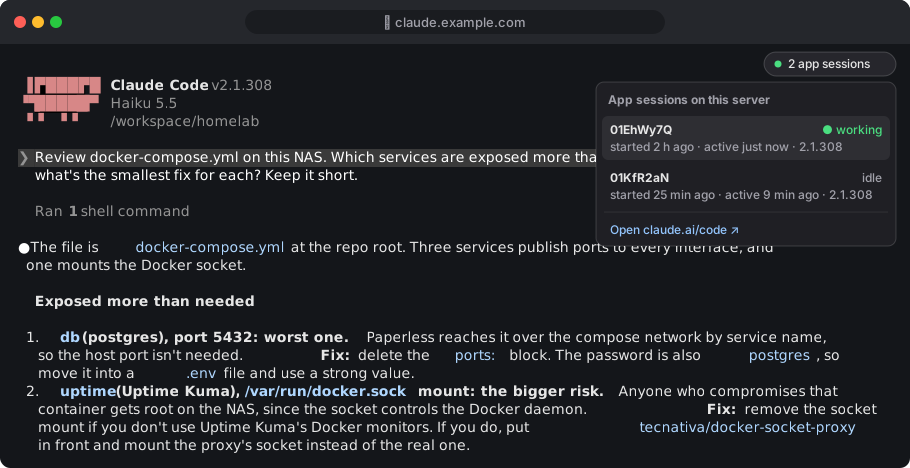
A small badge shows sessions started from the app, with a dot while one is working and a link to each.

Copy and paste that works

A newer terminal client and tmux settings so copies reach your clipboard, and the long sign-in link is clickable.

Clean stops

A container stop gives Claude time to finish instead of killing it mid-tool-call. A health check reports the terminal's state.

Runs as your user

Any UID and GID, so files on your shares keep the right owner. SSH and git work even without a passwd entry.

How it fits together

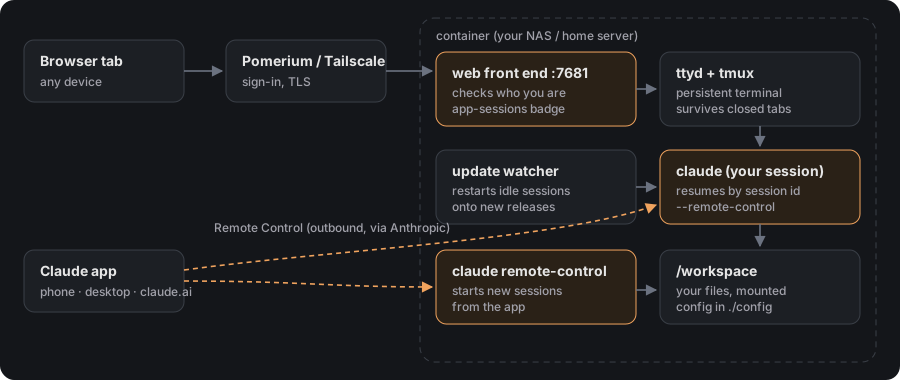
Your proxy signs you in. The container checks it again, then hands you the terminal. The Claude app talks to the same machine through Remote Control, outbound only, with nothing extra exposed.

Browser to Pomerium or Tailscale to the web front end, ttyd and tmux, Claude Code; the Claude app reaches the same container through Remote Control
The app-sessions badge, open, listing sessions started from the Claude app
The app-sessions badge, open. Session names are illustrative.

How it compares

Other good projects put Claude Code in a container, and they aim at different things. This one does a single job: Claude Code's own interface on a server, wired into the Claude app.

claude-code-remote-containerHolyClaudeclaudeboxbeevelop/docker-claude
What it isClaude Code on a server, in the browser and the Claude appAll-in-one AI workstationIsolated dev sandbox with language profilesHeadless Remote Control server
InterfaceClaude Code's own terminal UI in a browser tabCloudCLI web app with its own accountYour local terminalClaude app only
Claude app / Remote Control✓ Terminal session and new sessions--✓ New sessions
Always-on service✓✓- Per project, on demand✓
Resumes your conversation✓ By session id---
Applies Claude Code updates✓ When idle, after a run checkWith image releasesOn rebuild-
Built-in access check✓ Pomerium assertion or trusted headerWeb app loginLocal only-
What's insideClaude Code, ttyd, tmux, git, Node, Python8 AI CLIs, Chromium, Playwright, 50+ toolsProfiles per language stack, firewallDeveloper toolchain

From each project's README, October 2026. If you want a full browser workstation with many AI tools, HolyClaude is the richer choice. If you want an isolated sandbox per project on your laptop, use claudebox.

Get started

Any machine with Docker Compose. Synology users: create a project in Container Manager with the same compose file.

  1. Get the compose file and an env file.
  2. Create the folders, owned by the user the container runs as.
  3. Start it, open the terminal, run /login with your Claude account, and accept the folder trust prompt.
  4. Put Pomerium or Tailscale in front, and turn on the container's own user check.
git clone https://github.com/cmmichael/claude-code-remote-container && cd claude-code-remote-container
cp .env.example .env          # set PUID, PGID, WORKSPACE_DIR
mkdir -p config workspace && sudo chown "$(id -u):$(id -g)" config workspace
docker compose up -d
# then open http://127.0.0.1:7681

Full instructions, the Synology walk-through, and Pomerium and Tailscale setups are in the README. Remote Control needs a claude.ai subscription; API keys don't work for it.